
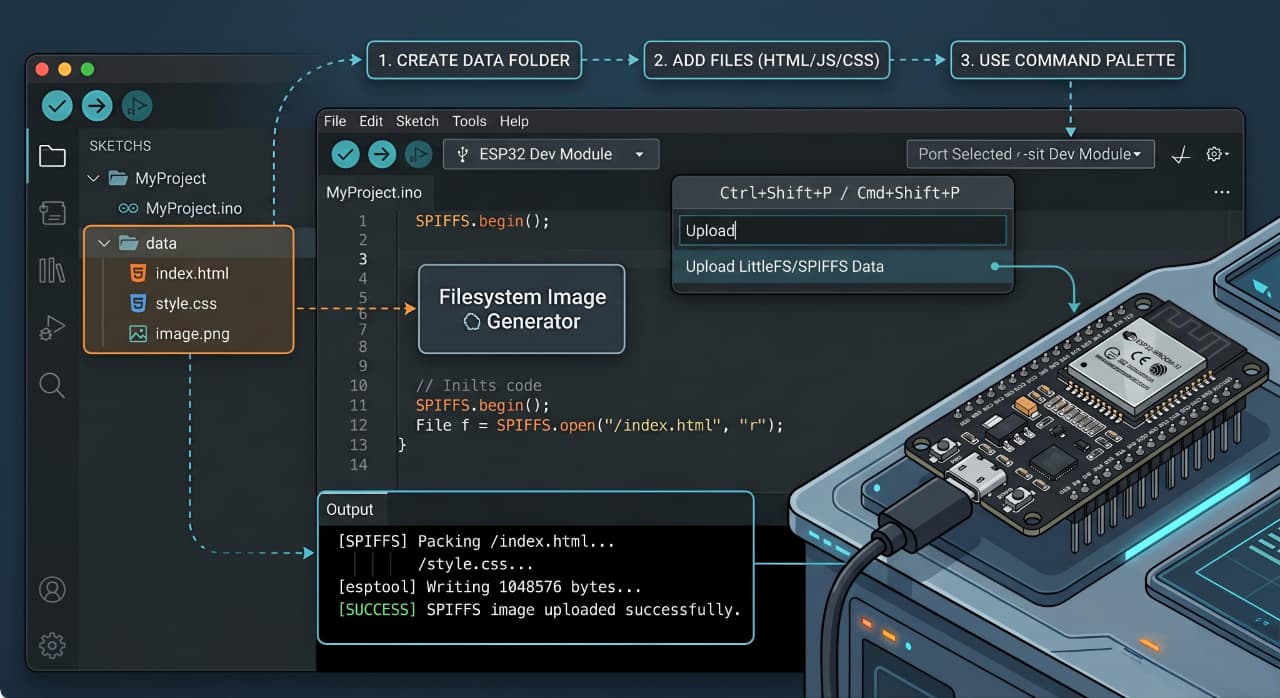
ESP32 SPIFFS File Upload Tool using Arduino IDE 2x

When working with ESP32 projects that serve web interfaces or store configuration files, managing the SPIFFS (SPI Flash File System) can be challenging. While Arduino IDE 1.x had built-in SPIFFS upload tools, Arduino IDE 2.x users were left without an easy solution—until now.
Today, I'm excited to share a comprehensive ESP32 SPIFFS upload tool that brings modern functionality to Arduino IDE 2.x with multiple upload methods, JSON configuration, and seamless VS Code integration.
🔗 Get the complete tool from GitHub →
The Problem with Modern ESP32 Development
 The evolution from Arduino IDE 1.x to 2.x left a gap in SPIFFS tools
Arduino IDE 2.x brought many improvements, but it removed the convenient SPIFFS upload plugin that many ESP32 developers relied on. This left developers with few options:
- Manually using command-line tools with complex syntax
- Creating custom scripts for each project
- Reverting to Arduino IDE 1.x just for SPIFFS uploads
- Abandoning SPIFFS altogether
None of these solutions were ideal for modern development workflows, especially when working with VS Code or other advanced editors.
Introducing the ESP32 SPIFFS Upload Tool
This new tool solves these problems by providing four flexible upload methods wrapped in a clean, configurable package. Explore the source code on GitHub to see how it works under the hood.
🚀 Four Upload Methods
 Choose the right upload method for your development workflow
1. Serial Upload (Traditional)
Perfect for development and initial deployment:
Ideal for deployed devices and remote updates:
Great for production builds and custom deployment:
The most integrated development experience - just press Ctrl+Shift+P and select your task!
💡 Want to see all available options? Check the detailed documentation on GitHub.
JSON Configuration: The Heart of Simplicity
 Clean, readable configuration eliminates complex command-line arguments
Instead of remembering complex command-line arguments, everything is configured through a simple JSON file. View the complete configuration schema on GitHub:
This approach makes the tool:
- Version-controllable: Store configurations with your code
- Team-friendly: Share settings across development teams
- Environment-specific: Different configs for dev/staging/production
- Self-documenting: Clear, readable settings
VS Code Integration: Professional Development Workflow
 Seamless integration with VS Code tasks and terminal
The tool includes pre-configured VS Code tasks that integrate perfectly with your development workflow. Download the complete VS Code configuration from GitHub:
- ESP32 SPIFFS Upload (Config) - Serial upload
- ESP32 SPIFFS Upload (Config + OTA) - OTA upload
- ESP32 SPIFFS Create Image Only (Config) - Image creation
- ESP32 Config - Edit - Quick configuration editing
Simply press Ctrl+Shift+P, type "Tasks: Run Task", and select your desired upload method. All output appears in VS Code's integrated terminal with proper syntax highlighting and error reporting.
Real-World Use Cases
Web Server Projects
 Upload HTML, CSS, JavaScript, and assets to create rich web interfaces
Store your web interface files in the data folder:
See complete web server examples in the GitHub repository
IoT Configuration Management
Store device configurations, certificates, and settings files that can be updated remotely via OTA without reflashing firmware.
Data Logging
Upload CSV templates, log file structures, or data processing scripts that your ESP32 can access at runtime.
Advanced Features for Power Users
 Fine-tune every aspect of the upload process
Multiple Board Support
- ESP32 (original)
- ESP32-S2
- ESP32-S3
- ESP32-C3
- Custom board configurations
Check the full board compatibility list on GitHub
Flexible Tool Detection
Automatically finds Arduino tools across different installation paths and versions, supporting both standard Arduino IDE and VS Code Arduino extensions.
Verbose Debugging
Enable detailed logging to troubleshoot upload issues:
Add custom arguments for advanced use cases:
Explore all advanced configuration options on GitHub
Performance and Reliability
 Optimized for speed and reliability across different hardware configurations
The tool is optimized for performance:
- High-speed uploads: 921600 baud rate default
- OTA optimization: Often faster than serial for large file sets
- Cross-platform: Windows, macOS, and Linux support
- Error handling: Comprehensive error messages and recovery suggestions
Getting Started in 5 Minutes
1. Download and Setup
Clone or download from GitHub:
- Serial port (e.g., "COM3")
- Board type (e.g., "esp32dev")
- OTA IP address if using wireless
3. Upload
Choose your preferred method:
- VS Code:
Ctrl+Shift+P→ "Tasks: Run Task" - Batch: Run upload_spiffs.bat
- Command line:
python [esp32_spiffs_upload.py](http://_vscodecontentref_/3) --config esp32_spiffs_config.json
Follow the complete setup guide on GitHub
Troubleshooting Common Issues
 Common solutions for typical SPIFFS upload problems
Port Access Issues
- Close Arduino IDE Serial Monitor before uploading
- Check port permissions on Linux/macOS
- Verify correct port name in configuration
Tool Detection Problems
- Reinstall ESP32 Arduino Core via Boards Manager
- Restart VS Code after Arduino installation
- Enable verbose mode for detailed tool paths
OTA Upload Failures
- Verify ESP32 WiFi connection and IP address
- Ensure firmware supports OTA updates
- Check firewall settings
Found a bug or need help? Create an issue on GitHub
Contributing and Community
This is an open-source project that thrives on community contributions! Here's how you can get involved:
- 🐛 Report bugs: Create an issue on GitHub
- 💡 Suggest features: Start a discussion on GitHub
- 🔧 Contribute code: Submit a pull request on GitHub
- 📖 Improve docs: Help make the documentation even better
Check out the contributing guidelines on GitHub
The Future of ESP32 Development Tools
This tool represents a shift toward more professional, configurable development tools for the ESP32 ecosystem. By combining the simplicity of Arduino with the power of modern development environments, we can create better IoT projects faster.
 Modern tools enable better ESP32 projects
The open-source nature of this tool means the community can extend and improve it. See our roadmap and upcoming features on GitHub. Future enhancements might include:
- GUI interface for non-technical users
- Integration with PlatformIO
- Support for other ESP32 file systems
- Automated testing and deployment pipelines
Conclusion
Managing SPIFFS files on ESP32 doesn't have to be complicated. This modern upload tool brings professional-grade functionality to Arduino IDE 2.x users while maintaining the simplicity that makes Arduino development accessible.
Whether you're building web-enabled IoT devices, storing configuration files, or managing data logging systems, this tool provides the flexibility and reliability you need for modern ESP32 development.
🚀 Download the complete tool from GitHub and start uploading SPIFFS files the modern way!
Quick Links:
Have you tried this ESP32 SPIFFS upload tool? Star the repository on GitHub and share your experience in the comments below! Let me know what features you'd like to see in future versions.
 Get started with modern ESP32 SPIFFS management today
Tags: #ESP32 #Arduino #SPIFFS #IoT #WebDevelopment #VSCode #OTA #EmbeddedSystems #OpenSource #GitHub



Comments